> ## Documentation Index
> Fetch the complete documentation index at: https://docs.helicone.ai/llms.txt
> Use this file to discover all available pages before exploring further.
# Proxy vs Async Integration
> Compare Helicone's Proxy and Async integration methods. Understand the features, benefits, and use cases for each approach to choose the best fit for your LLM application.
## Quick Compare
There are two ways to interface with Helicone - Proxy and Async. We will help you decide which one is right for you, and the pros and cons with each option.
| | Proxy | Async |
| ------------------------------------------------------------------- | ----- | ----- |
| **Easy setup** | ✅ | ❌ |
| [Prompts](/features/prompts/) | ✅ | ✅ |
| [Prompts Auto Formatting (easier)](/features/prompts) | ✅ | ❌ |
| [Custom Properties](/features/advanced-usage/custom-properties) | ✅ | ✅ |
| [Bucket Cache](/features/advanced-usage/caching) | ✅ | ❌ |
| [User Metrics](/features/advanced-usage/user-metrics) | ✅ | ✅ |
| [Retries](/features/advanced-usage/retries) | ✅ | ❌ |
| [Custom rate limiting](/features/advanced-usage/custom-rate-limits) | ✅ | ❌ |
| Open-source | ✅ | ✅ |
| Not on critical path | ❌ | ✅ |
| 0 Propagation Delay | ❌ | ✅ |
| Negligible Logging Delay | ✅ | ✅ |
| Streaming Support | ✅ | ✅ |
## Proxy
The primary reason Helicone users choose to integrate with Helicone using Proxy is its **simple integration**.
It's as easy as changing the base URL to point to Helicone, and we'll forward the request to the LLM and return the response to you.
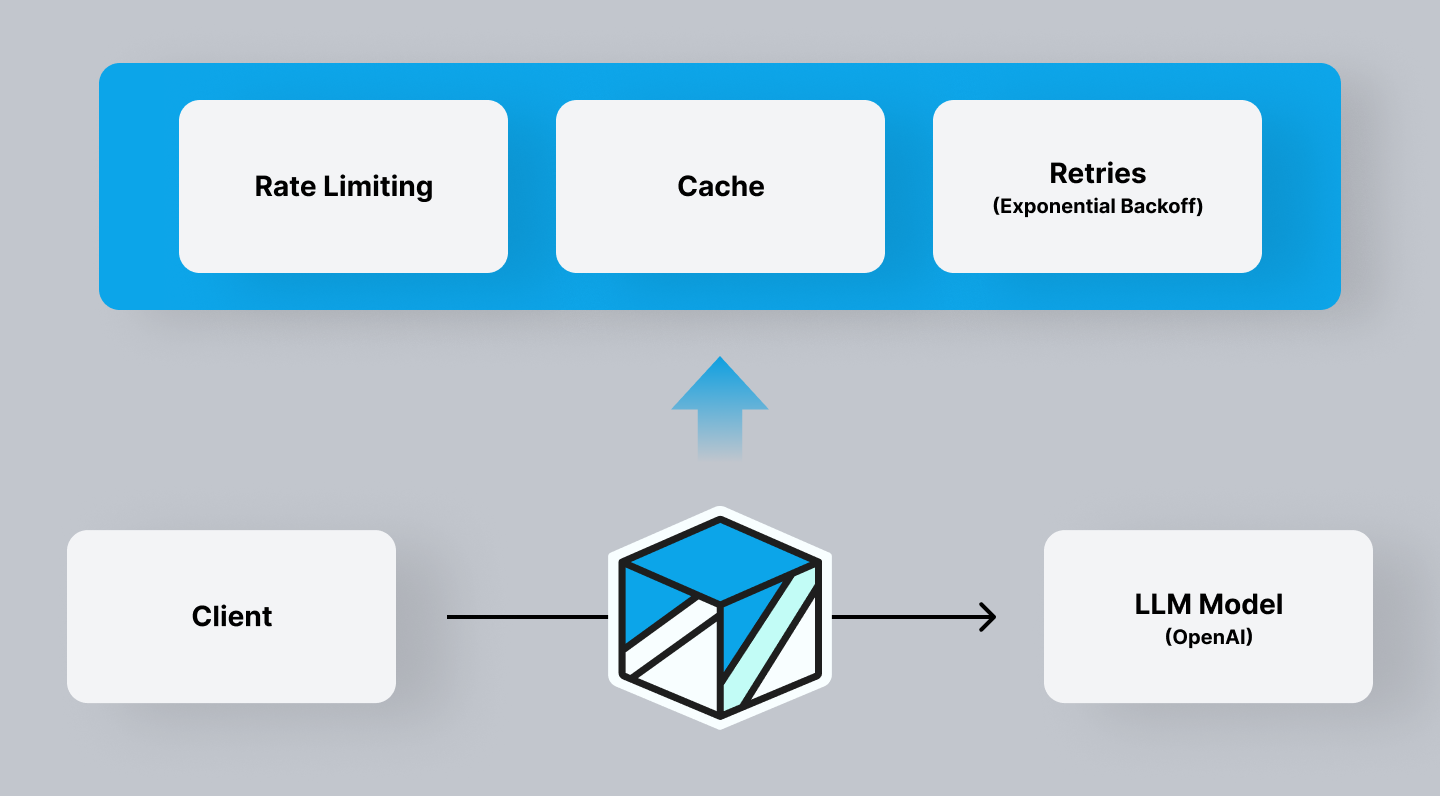 Since the proxy sits on the edge and is the gatekeeper of the requests, you get access to a suite of Gateway tools such as caching, rate limiting, API key management, threat detection, moderations and more.
Instead of calling the OpenAI API with `api.openai.com`, you will change the URL to a Helicone dedicated domain `oai.helicone.ai`.
You can also use the general Gateway URL `gateway.helicone.ai` if Helicone doesn't have a dedicated domain for the provider yet.
```python Dedicated domain example theme={null}
import openai
# Set the API base URL to Helicone's proxy
openai.api_base = "https://oai.helicone.ai/v1"
# Generate a chat completion request
response = openai.ChatCompletion.create(
model="gpt-4o-mini",
messages=[{"role": "user", "content": "Say hi!"}],
headers={
"Helicone-Auth": "Bearer [HELICONE_API_KEY]" # Your Helicone API key
}
)
print(response)
```
```python Other (Gateway example) theme={null}
import openai
openai.api_base = "https://gateway.helicone.ai" # Set the API base URL to Helicone Gateway
response = openai.ChatCompletion.create(
model="[DEPLOYMENT]",
messages=[{"role": "user", "content": "Say hi!"}],
headers={
"Helicone-Auth": "Bearer [HELICONE_API_KEY]", # Your Helicone API key
"Helicone-Target-Url": "https://api.lemonfox.ai", # The target API URL
"Helicone-Target-Provider": "LemonFox", # The provider name
}
)
print(response)
```
For a detailed documentation, check out [Gateway Integration](https://docs.helicone.ai/getting-started/integration-method/gateway).
## Async
Helicone Async allows for a more flexible workflow where the actual logging of the event is **not on the critical path**. This gives some users more confidence that if we are going down or if there is a network issue that it will not affect their application.
[Get started with OpenLLMetry](/getting-started/integration-method/openllmetry).
Since the proxy sits on the edge and is the gatekeeper of the requests, you get access to a suite of Gateway tools such as caching, rate limiting, API key management, threat detection, moderations and more.
Instead of calling the OpenAI API with `api.openai.com`, you will change the URL to a Helicone dedicated domain `oai.helicone.ai`.
You can also use the general Gateway URL `gateway.helicone.ai` if Helicone doesn't have a dedicated domain for the provider yet.
```python Dedicated domain example theme={null}
import openai
# Set the API base URL to Helicone's proxy
openai.api_base = "https://oai.helicone.ai/v1"
# Generate a chat completion request
response = openai.ChatCompletion.create(
model="gpt-4o-mini",
messages=[{"role": "user", "content": "Say hi!"}],
headers={
"Helicone-Auth": "Bearer [HELICONE_API_KEY]" # Your Helicone API key
}
)
print(response)
```
```python Other (Gateway example) theme={null}
import openai
openai.api_base = "https://gateway.helicone.ai" # Set the API base URL to Helicone Gateway
response = openai.ChatCompletion.create(
model="[DEPLOYMENT]",
messages=[{"role": "user", "content": "Say hi!"}],
headers={
"Helicone-Auth": "Bearer [HELICONE_API_KEY]", # Your Helicone API key
"Helicone-Target-Url": "https://api.lemonfox.ai", # The target API URL
"Helicone-Target-Provider": "LemonFox", # The provider name
}
)
print(response)
```
For a detailed documentation, check out [Gateway Integration](https://docs.helicone.ai/getting-started/integration-method/gateway).
## Async
Helicone Async allows for a more flexible workflow where the actual logging of the event is **not on the critical path**. This gives some users more confidence that if we are going down or if there is a network issue that it will not affect their application.
[Get started with OpenLLMetry](/getting-started/integration-method/openllmetry).
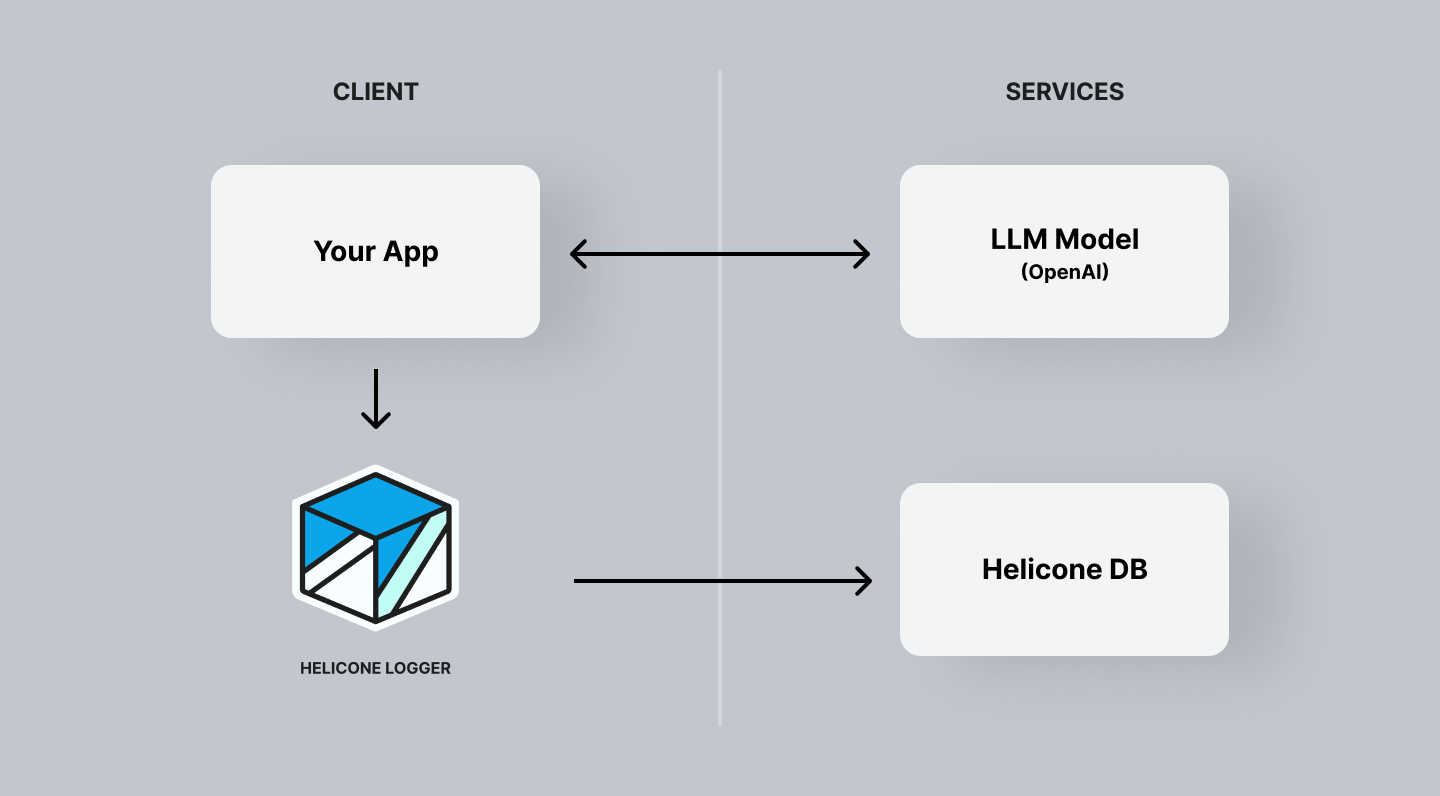 The downside is that we cannot offer the same suite of tools as we can with
the proxy.
## Summary
### When to Use Proxy
* When you need a quick and easy setup.
* If you require Gateway features like custom rate limiting, caching, and retries.
* When you want to use tools that can be instrumented directly into the proxy.
### When to Use Async
* If you prefer the logging of events to be off the critical path, ensuring that network issues do not affect your application.
* When you need zero propagation delay.
Choose your LLM provider and get started with Helicone.
***
Additional questions or feedback? Reach out to
[help@helicone.ai](mailto:help@helicone.ai) or [schedule a
call](https://cal.com/team/helicone/helicone-discovery) with us.
The downside is that we cannot offer the same suite of tools as we can with
the proxy.
## Summary
### When to Use Proxy
* When you need a quick and easy setup.
* If you require Gateway features like custom rate limiting, caching, and retries.
* When you want to use tools that can be instrumented directly into the proxy.
### When to Use Async
* If you prefer the logging of events to be off the critical path, ensuring that network issues do not affect your application.
* When you need zero propagation delay.
Choose your LLM provider and get started with Helicone.
***
Additional questions or feedback? Reach out to
[help@helicone.ai](mailto:help@helicone.ai) or [schedule a
call](https://cal.com/team/helicone/helicone-discovery) with us.