> ## Documentation Index
> Fetch the complete documentation index at: https://docs.helicone.ai/llms.txt
> Use this file to discover all available pages before exploring further.
# Helicone Auth
> Complete guide to Helicone authentication. Learn about API key types, permissions, regional variations, and alternative authentication methods.
## Helicone Auth keys
When creating a new Helicone API key you have the ability to enable read and write permissions.
Write keys can be used through Helicone via our proxy, feedback or any other Helicone service when calling a `POST` or using our gateway.
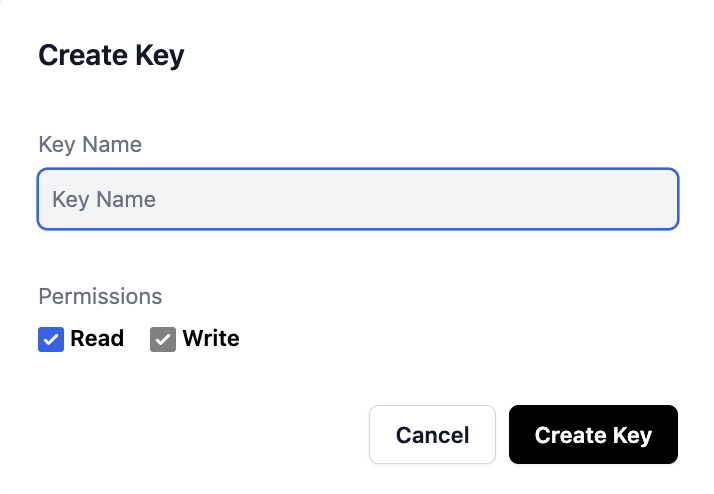 Key's with read permissions will start with `sk-` and keys with write
permissions will start with `pk-`.
## Helicone Keys in the EU
For our EU customers, keys are generated with the prefix `eu-` this allows our edge workers to know which region to route the request to.
## Using `Helicone-Auth` not in the header
Typically to authenticate Helicone you will need to add a header called `Helicone-Auth`. However, in some environments you do not have access to headers, and you only have the ability to change the base URL. In this case, you can actually embed the API key directly into the URL path.
You are now allowed to use a write only key within the URL path to authenticate your requests.
This is done by changing the base URL to `https://gateway.helicone.ai/[HELICONE_API_KEY]/v1/` where `[HELICONE_API_KEY]` is your Helicone API key.
This will work with any of our [supported domains](/getting-started/integration-method/gateway#approved-domains).
Key's with read permissions will start with `sk-` and keys with write
permissions will start with `pk-`.
## Helicone Keys in the EU
For our EU customers, keys are generated with the prefix `eu-` this allows our edge workers to know which region to route the request to.
## Using `Helicone-Auth` not in the header
Typically to authenticate Helicone you will need to add a header called `Helicone-Auth`. However, in some environments you do not have access to headers, and you only have the ability to change the base URL. In this case, you can actually embed the API key directly into the URL path.
You are now allowed to use a write only key within the URL path to authenticate your requests.
This is done by changing the base URL to `https://gateway.helicone.ai/[HELICONE_API_KEY]/v1/` where `[HELICONE_API_KEY]` is your Helicone API key.
This will work with any of our [supported domains](/getting-started/integration-method/gateway#approved-domains).