> ## Documentation Index
> Fetch the complete documentation index at: https://docs.helicone.ai/llms.txt
> Use this file to discover all available pages before exploring further.
# Getting User Requests
> Use the Request API to retrieve user-specific requests, allowing you to monitor, debug, and track costs for individual users.
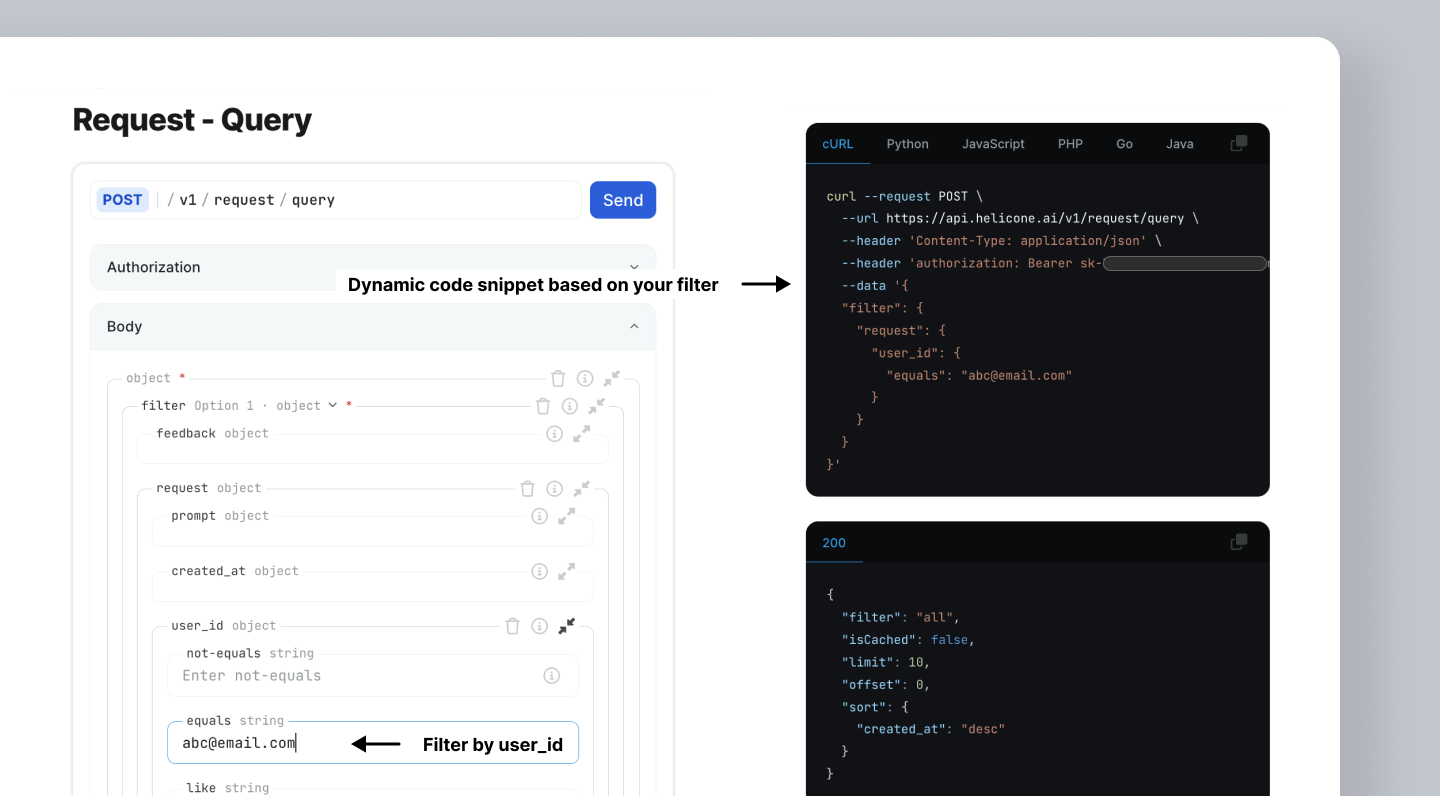
The [Request API](/rest/request/post-v1requestquery) allows you to build a request, where you can specify filtering criteria to retrieve all requests made by a user.
**API Endpoint Note:** This guide uses the `/v1/request/query` endpoint which is optimized for small to medium datasets.
For **large datasets or bulk exports**, use the [/v1/request/query-clickhouse](/rest/request/post-v1requestquery-clickhouse) endpoint instead, which has a different filter structure:
* `/query` uses `request` wrapper: `{"filter": {"request": {"user_id": {...}}}}`
* `/query-clickhouse` uses `request_response_rmt` wrapper: `{"filter": {"request_response_rmt": {"user_id": {...}}}}`
 ## Use Cases
* Monitor your user's usage pattern and behavior.
* Access user-specific requests to pinpoint the errors and bebug more efficiently.
* Track requests and costs per user to facilitate better cost control.
* Detect unusual or potentially harmful user behaviors.
## Retrieving Requests by User ID
Here's an example to get all the requests where `user_id` is `abc@email.com`.
```bash theme={null}
curl --request POST \
--url https://api.helicone.ai/v1/request/query \
--header "Content-Type: application/json" \
--header "authorization: Bearer $HELICONE_API_KEY" \
--data '{
"filter": {
"request": {
"user_id": {
"equals": "abc@email.com"
}
}
}
}'
```
By using the [Request API](/rest/request/post-v1requestquery), the code
snippet will dynamically populate on the page, so you can copy and paste.{" "}
## Adding Additional Filters
You can structure your query to add any number of filters.
**Note**: To add multiple filters, change the filter to a branch and nest the ANDs/ORs as an abstract syntax tree.
```bash theme={null}
curl --request POST \
--url https://api.helicone.ai/v1/request/query \
--header "Content-Type: application/json" \
--header "authorization: Bearer $HELICONE_API_KEY" \
--data '{
"filter": {
"operator": "and",
"right": {
"request": {
"model": {
"contains": "gpt-4o-mini"
}
}
},
"left": {
"request": {
"user_id": {
"equals": "abc@email.com"
}
}
}
}
}'
```
***
Additional questions or feedback? Reach out to
[help@helicone.ai](mailto:help@helicone.ai) or [schedule a
call](https://cal.com/team/helicone/helicone-discovery) with us.
## Use Cases
* Monitor your user's usage pattern and behavior.
* Access user-specific requests to pinpoint the errors and bebug more efficiently.
* Track requests and costs per user to facilitate better cost control.
* Detect unusual or potentially harmful user behaviors.
## Retrieving Requests by User ID
Here's an example to get all the requests where `user_id` is `abc@email.com`.
```bash theme={null}
curl --request POST \
--url https://api.helicone.ai/v1/request/query \
--header "Content-Type: application/json" \
--header "authorization: Bearer $HELICONE_API_KEY" \
--data '{
"filter": {
"request": {
"user_id": {
"equals": "abc@email.com"
}
}
}
}'
```
By using the [Request API](/rest/request/post-v1requestquery), the code
snippet will dynamically populate on the page, so you can copy and paste.{" "}
## Adding Additional Filters
You can structure your query to add any number of filters.
**Note**: To add multiple filters, change the filter to a branch and nest the ANDs/ORs as an abstract syntax tree.
```bash theme={null}
curl --request POST \
--url https://api.helicone.ai/v1/request/query \
--header "Content-Type: application/json" \
--header "authorization: Bearer $HELICONE_API_KEY" \
--data '{
"filter": {
"operator": "and",
"right": {
"request": {
"model": {
"contains": "gpt-4o-mini"
}
}
},
"left": {
"request": {
"user_id": {
"equals": "abc@email.com"
}
}
}
}
}'
```
***
Additional questions or feedback? Reach out to
[help@helicone.ai](mailto:help@helicone.ai) or [schedule a
call](https://cal.com/team/helicone/helicone-discovery) with us.