> ## Documentation Index
> Fetch the complete documentation index at: https://docs.helicone.ai/llms.txt
> Use this file to discover all available pages before exploring further.
# Webhooks
**March 2025 Update**: We've enhanced our webhook implementation to provide a
unified `request_response_url` field that contains both request and response
data in a single object. This improves performance and simplifies data
retrieval. [Learn more](#understanding-webhooks).
When building LLM applications, you often need to react to events in real-time, track usage patterns, or trigger downstream actions based on AI interactions. Webhooks provide instant notifications when LLM requests complete, allowing you to automate workflows, score responses, and integrate AI activity with external systems.
## Why use Webhooks
* **Real-time evaluation**: Automatically score and evaluate LLM responses for quality, safety, and relevance
* **Data pipeline integration**: Stream LLM data to external systems, data warehouses, or analytics platforms
* **Automated workflows**: Trigger downstream actions like notifications, content moderation, or process automation
## Quick Start
Navigate to the [webhooks page](https://us.helicone.ai/webhooks) and add your webhook URL:
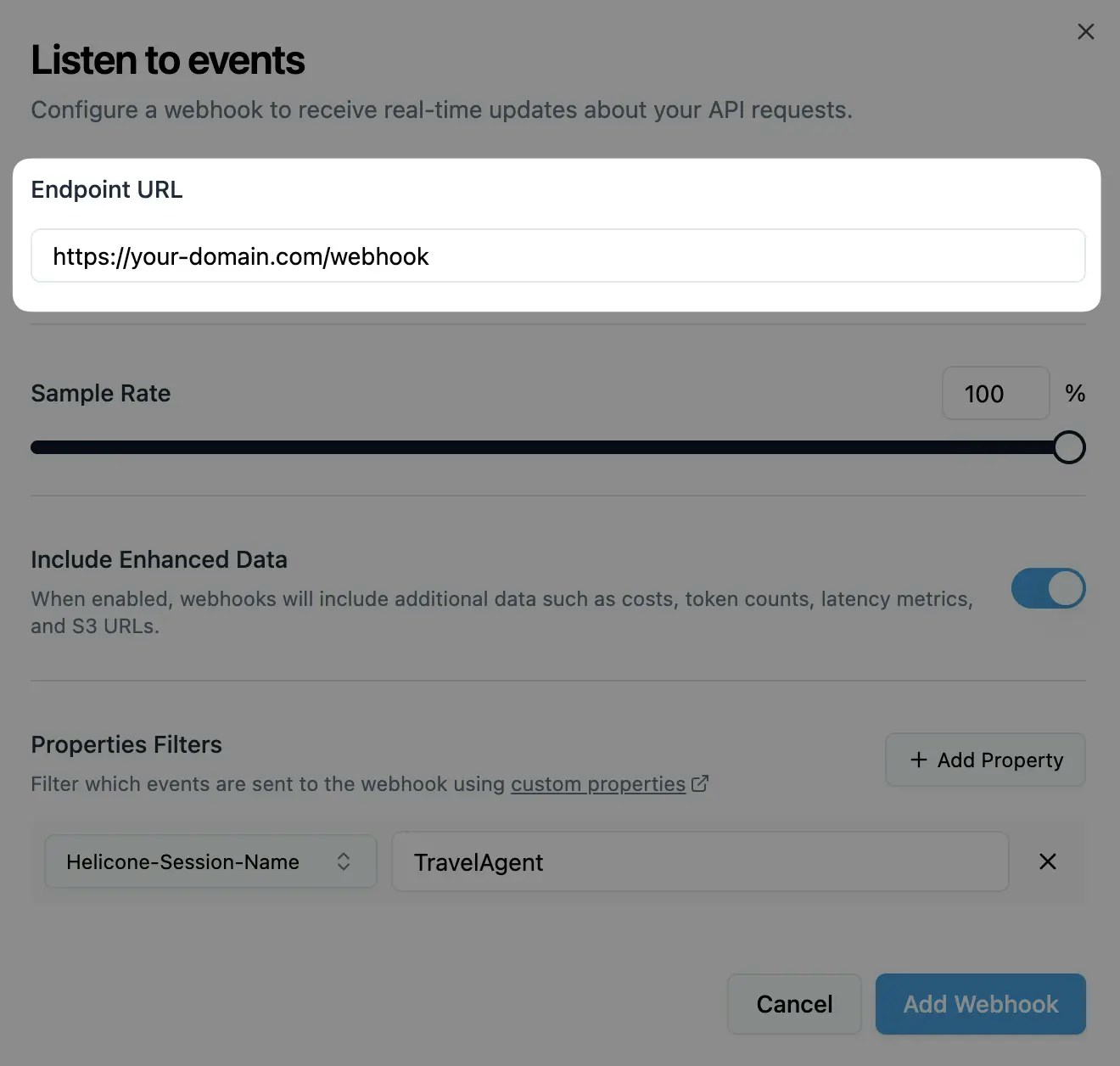 Your webhook endpoint should accept POST requests.
Select which events trigger webhooks and add any property filters:
Your webhook endpoint should accept POST requests.
Select which events trigger webhooks and add any property filters:
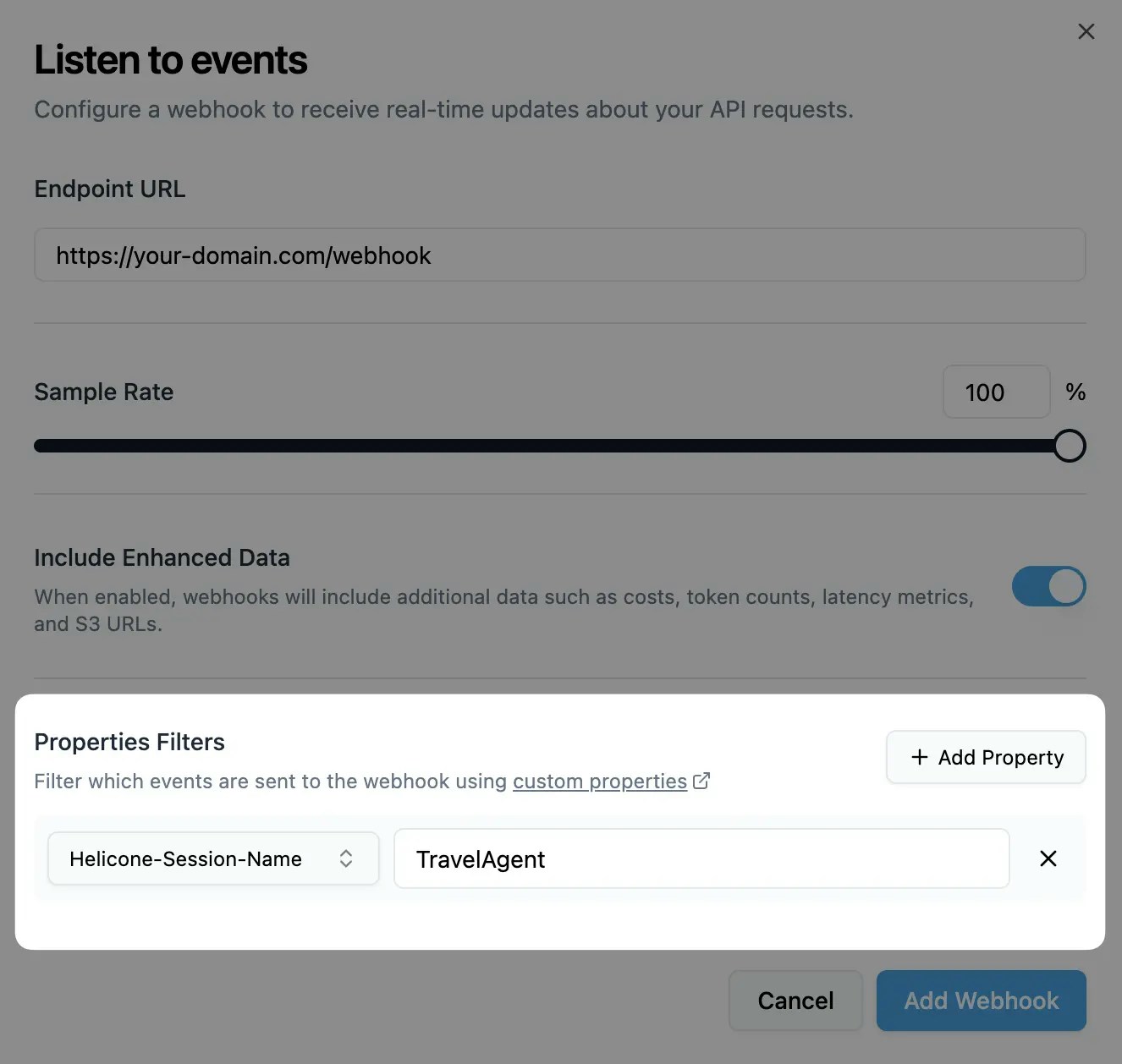 You can also create webhooks programmatically using our [REST API](/rest/webhooks/post-v1webhooks).
Copy the HMAC key from the dashboard and validate webhook signatures:
```javascript theme={null}
import crypto from "crypto";
function verifySignature(payload, signature, secret) {
const hmac = crypto.createHmac("sha256", secret);
hmac.update(JSON.stringify(payload));
const calculatedSignature = hmac.digest("hex");
return crypto.timingSafeEqual(
Buffer.from(calculatedSignature, "hex"),
Buffer.from(signature, "hex")
);
}
```
## Configuration Options
Configure your webhook behavior through the [dashboard](https://us.helicone.ai/webhooks) or [REST API](/rest/webhooks/post-v1webhooks):
### Basic Settings
| Setting | Description | Default |
| ------------------- | ---------------------------------------------------- | ------- |
| **Destination URL** | URL where webhook payloads are sent | None |
| **Sample Rate** | Percentage of requests that trigger webhooks (0-100) | 100% |
| **Include Data** | Include enhanced metadata and S3 URLs | Enabled |
### Advanced Settings
| Setting | Description | Default |
| -------------------- | -------------------------------------------------------- | ------- |
| **Property Filters** | Only send webhooks for requests with specific properties | None |
Filter webhooks based on custom properties you set in requests:
```javascript theme={null}
// In your LLM request
headers: {
"Helicone-Property-Environment": "production",
"Helicone-Property-UserId": "user-123"
}
// Webhook filter configuration
{
"environment": "production",
"userId": "user-123"
}
```
Only requests matching ALL specified properties will trigger webhooks.
## Use Cases
Monitor AI responses for regulatory compliance and policy violations:
```javascript theme={null}
export default async function handler(req, res) {
const { request_id, request_response_url, user_id, metadata } = req.body;
// Verify webhook signature
if (!verifySignature(req.body, req.headers["helicone-signature"], process.env.WEBHOOK_SECRET)) {
return res.status(401).json({ error: "Unauthorized" });
}
// Fetch complete interaction data
const response = await fetch(request_response_url);
const { request, response: llmResponse } = await response.json();
const userMessage = request.messages[0].content;
const aiResponse = llmResponse.choices[0].message.content;
// Check for PII in user input
const piiDetected = await detectPII(userMessage);
if (piiDetected.found) {
await complianceAlerts.sendPIIAlert({
requestId: request_id,
userId: user_id,
piiTypes: piiDetected.types,
content: userMessage
});
}
// Monitor AI response for policy violations
const policyCheck = await checkCompliancePolicy(aiResponse);
if (policyCheck.violations.length > 0) {
await complianceAlerts.sendPolicyViolation({
requestId: request_id,
violations: policyCheck.violations,
severity: policyCheck.severity,
content: aiResponse
});
}
// Log compliance metrics
await complianceLogger.log({
requestId: request_id,
timestamp: new Date().toISOString(),
piiDetected: piiDetected.found,
policyViolations: policyCheck.violations.length,
complianceScore: policyCheck.score
});
return res.status(200).json({ message: "Compliance check completed" });
}
```
Stream LLM data to external systems:
```javascript theme={null}
export default async function handler(req, res) {
const { request_id, request_response_url, user_id, model } = req.body;
// Fetch complete interaction data
const response = await fetch(request_response_url);
const fullData = await response.json();
// Transform data for your analytics system
const analyticsEvent = {
id: request_id,
userId: user_id,
model: model,
timestamp: new Date().toISOString(),
prompt: fullData.request.messages[0].content,
response: fullData.response.choices[0].message.content,
metadata: req.body.metadata
};
// Send to your data pipeline
await Promise.all([
// Send to analytics platform
analytics.track(analyticsEvent),
// Store in data warehouse
dataWarehouse.store(analyticsEvent),
// Update real-time dashboards
dashboards.updateMetrics(analyticsEvent)
]);
return res.status(200).json({ message: "Data processed" });
}
```
## Understanding Webhooks
### Webhook Payload Structure
Webhooks deliver structured data about completed LLM requests:
**Standard payload:**
```json theme={null}
{
"request_id": "550e8400-e29b-41d4-a716-446655440000",
"user_id": "user-123", // Only if set in original request
"request_body": "truncated-request-data",
"response_body": "truncated-response-data"
}
```
**Enhanced payload (when `include_data` is enabled):**
```json theme={null}
{
"request_id": "550e8400-e29b-41d4-a716-446655440000",
"user_id": "user-123",
"request_body": "truncated-request-data",
"response_body": "truncated-response-data",
"request_response_url": "https://s3-url-containing-full-data",
"model": "gpt-4o-mini",
"provider": "openai",
"metadata": {
"cost": 0.0015,
"promptTokens": 10,
"completionTokens": 15,
"totalTokens": 25,
"latencyMs": 1200
}
}
```
### Request/Response URL Data
The `request_response_url` contains complete, untruncated data:
```javascript theme={null}
// Fetch complete data
const response = await fetch(request_response_url);
const { request, response: llmResponse } = await response.json();
// Access full request data
console.log("Model:", request.model);
console.log("Messages:", request.messages);
console.log("Parameters:", request.temperature, request.max_tokens);
// Access full response data
console.log("Response:", llmResponse.choices[0].message.content);
console.log("Usage:", llmResponse.usage);
console.log("Finish reason:", llmResponse.choices[0].finish_reason);
```
### Security Best Practices
**Always verify webhook signatures:**
```javascript theme={null}
function verifyWebhookSignature(payload, signature, secret) {
const hmac = crypto.createHmac("sha256", secret);
hmac.update(JSON.stringify(payload));
const calculatedSignature = hmac.digest("hex");
return crypto.timingSafeEqual(
Buffer.from(calculatedSignature, "hex"),
Buffer.from(signature, "hex")
);
}
// In your webhook handler
const isValid = verifyWebhookSignature(
req.body,
req.headers["helicone-signature"],
process.env.HELICONE_WEBHOOK_SECRET
);
if (!isValid) {
return res.status(401).json({ error: "Invalid signature" });
}
```
### Performance Considerations
**URL expiration:**
* `request_response_url` expires after 30 minutes
* Always use `request_response_url` for complete data
**Webhook timeouts:**
* Webhook delivery times out after 2 minutes
**Payload size limits:**
* Request/response bodies are truncated at 10KB in webhook payload
## Related Features
Score LLM responses automatically via webhooks for quality monitoring
Add metadata to requests for filtering and organizing webhook deliveries
Track per-user usage patterns and costs via webhook data
Test webhooks locally using ngrok or other tunneling tools
***
Additional questions or feedback? Reach out to
[help@helicone.ai](mailto:help@helicone.ai) or [schedule a
call](https://cal.com/team/helicone/helicone-discovery) with us.
You can also create webhooks programmatically using our [REST API](/rest/webhooks/post-v1webhooks).
Copy the HMAC key from the dashboard and validate webhook signatures:
```javascript theme={null}
import crypto from "crypto";
function verifySignature(payload, signature, secret) {
const hmac = crypto.createHmac("sha256", secret);
hmac.update(JSON.stringify(payload));
const calculatedSignature = hmac.digest("hex");
return crypto.timingSafeEqual(
Buffer.from(calculatedSignature, "hex"),
Buffer.from(signature, "hex")
);
}
```
## Configuration Options
Configure your webhook behavior through the [dashboard](https://us.helicone.ai/webhooks) or [REST API](/rest/webhooks/post-v1webhooks):
### Basic Settings
| Setting | Description | Default |
| ------------------- | ---------------------------------------------------- | ------- |
| **Destination URL** | URL where webhook payloads are sent | None |
| **Sample Rate** | Percentage of requests that trigger webhooks (0-100) | 100% |
| **Include Data** | Include enhanced metadata and S3 URLs | Enabled |
### Advanced Settings
| Setting | Description | Default |
| -------------------- | -------------------------------------------------------- | ------- |
| **Property Filters** | Only send webhooks for requests with specific properties | None |
Filter webhooks based on custom properties you set in requests:
```javascript theme={null}
// In your LLM request
headers: {
"Helicone-Property-Environment": "production",
"Helicone-Property-UserId": "user-123"
}
// Webhook filter configuration
{
"environment": "production",
"userId": "user-123"
}
```
Only requests matching ALL specified properties will trigger webhooks.
## Use Cases
Monitor AI responses for regulatory compliance and policy violations:
```javascript theme={null}
export default async function handler(req, res) {
const { request_id, request_response_url, user_id, metadata } = req.body;
// Verify webhook signature
if (!verifySignature(req.body, req.headers["helicone-signature"], process.env.WEBHOOK_SECRET)) {
return res.status(401).json({ error: "Unauthorized" });
}
// Fetch complete interaction data
const response = await fetch(request_response_url);
const { request, response: llmResponse } = await response.json();
const userMessage = request.messages[0].content;
const aiResponse = llmResponse.choices[0].message.content;
// Check for PII in user input
const piiDetected = await detectPII(userMessage);
if (piiDetected.found) {
await complianceAlerts.sendPIIAlert({
requestId: request_id,
userId: user_id,
piiTypes: piiDetected.types,
content: userMessage
});
}
// Monitor AI response for policy violations
const policyCheck = await checkCompliancePolicy(aiResponse);
if (policyCheck.violations.length > 0) {
await complianceAlerts.sendPolicyViolation({
requestId: request_id,
violations: policyCheck.violations,
severity: policyCheck.severity,
content: aiResponse
});
}
// Log compliance metrics
await complianceLogger.log({
requestId: request_id,
timestamp: new Date().toISOString(),
piiDetected: piiDetected.found,
policyViolations: policyCheck.violations.length,
complianceScore: policyCheck.score
});
return res.status(200).json({ message: "Compliance check completed" });
}
```
Stream LLM data to external systems:
```javascript theme={null}
export default async function handler(req, res) {
const { request_id, request_response_url, user_id, model } = req.body;
// Fetch complete interaction data
const response = await fetch(request_response_url);
const fullData = await response.json();
// Transform data for your analytics system
const analyticsEvent = {
id: request_id,
userId: user_id,
model: model,
timestamp: new Date().toISOString(),
prompt: fullData.request.messages[0].content,
response: fullData.response.choices[0].message.content,
metadata: req.body.metadata
};
// Send to your data pipeline
await Promise.all([
// Send to analytics platform
analytics.track(analyticsEvent),
// Store in data warehouse
dataWarehouse.store(analyticsEvent),
// Update real-time dashboards
dashboards.updateMetrics(analyticsEvent)
]);
return res.status(200).json({ message: "Data processed" });
}
```
## Understanding Webhooks
### Webhook Payload Structure
Webhooks deliver structured data about completed LLM requests:
**Standard payload:**
```json theme={null}
{
"request_id": "550e8400-e29b-41d4-a716-446655440000",
"user_id": "user-123", // Only if set in original request
"request_body": "truncated-request-data",
"response_body": "truncated-response-data"
}
```
**Enhanced payload (when `include_data` is enabled):**
```json theme={null}
{
"request_id": "550e8400-e29b-41d4-a716-446655440000",
"user_id": "user-123",
"request_body": "truncated-request-data",
"response_body": "truncated-response-data",
"request_response_url": "https://s3-url-containing-full-data",
"model": "gpt-4o-mini",
"provider": "openai",
"metadata": {
"cost": 0.0015,
"promptTokens": 10,
"completionTokens": 15,
"totalTokens": 25,
"latencyMs": 1200
}
}
```
### Request/Response URL Data
The `request_response_url` contains complete, untruncated data:
```javascript theme={null}
// Fetch complete data
const response = await fetch(request_response_url);
const { request, response: llmResponse } = await response.json();
// Access full request data
console.log("Model:", request.model);
console.log("Messages:", request.messages);
console.log("Parameters:", request.temperature, request.max_tokens);
// Access full response data
console.log("Response:", llmResponse.choices[0].message.content);
console.log("Usage:", llmResponse.usage);
console.log("Finish reason:", llmResponse.choices[0].finish_reason);
```
### Security Best Practices
**Always verify webhook signatures:**
```javascript theme={null}
function verifyWebhookSignature(payload, signature, secret) {
const hmac = crypto.createHmac("sha256", secret);
hmac.update(JSON.stringify(payload));
const calculatedSignature = hmac.digest("hex");
return crypto.timingSafeEqual(
Buffer.from(calculatedSignature, "hex"),
Buffer.from(signature, "hex")
);
}
// In your webhook handler
const isValid = verifyWebhookSignature(
req.body,
req.headers["helicone-signature"],
process.env.HELICONE_WEBHOOK_SECRET
);
if (!isValid) {
return res.status(401).json({ error: "Invalid signature" });
}
```
### Performance Considerations
**URL expiration:**
* `request_response_url` expires after 30 minutes
* Always use `request_response_url` for complete data
**Webhook timeouts:**
* Webhook delivery times out after 2 minutes
**Payload size limits:**
* Request/response bodies are truncated at 10KB in webhook payload
## Related Features
Score LLM responses automatically via webhooks for quality monitoring
Add metadata to requests for filtering and organizing webhook deliveries
Track per-user usage patterns and costs via webhook data
Test webhooks locally using ngrok or other tunneling tools
***
Additional questions or feedback? Reach out to
[help@helicone.ai](mailto:help@helicone.ai) or [schedule a
call](https://cal.com/team/helicone/helicone-discovery) with us.