> ## Documentation Index
> Fetch the complete documentation index at: https://docs.helicone.ai/llms.txt
> Use this file to discover all available pages before exploring further.
# Sessions
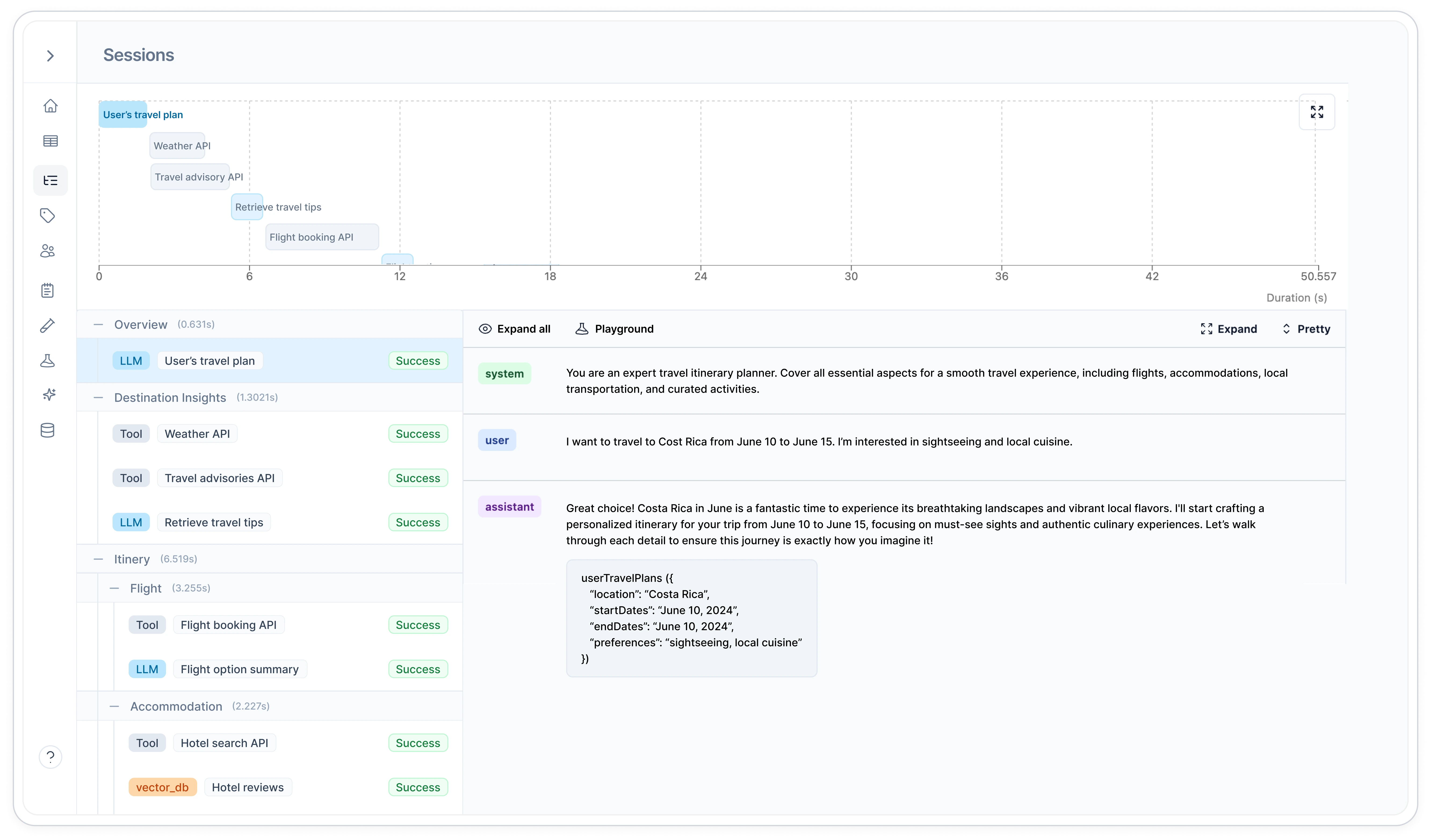
When building AI agents or complex workflows, your application often makes multiple LLM calls, vector database queries, and tool calls to complete a single task. Sessions group these related requests together, letting you trace the entire agent flow from initial user input to final response in one unified view.
## Why use Sessions
* **Debug AI agent flows**: See the entire agent workflow in one view, from initial request to final response
* **Track multi-step conversations**: Reconstruct the complete flow of chatbot interactions and complex tasks
* **Analyze performance**: Measure outcomes across entire interaction sequences, not just individual requests
 ## Quick Start
Include three required headers in your LLM requests:
```typescript theme={null}
{
"Helicone-Session-Id": "unique-session-id",
"Helicone-Session-Path": "/trace-path",
"Helicone-Session-Name": "Session Name"
}
```
Use path syntax to represent parent-child relationships:
```typescript theme={null}
"/abstract" // Top-level trace
"/abstract/outline" // Child trace
"/abstract/outline/lesson-1" // Grandchild trace
```
Execute your LLM request with the session headers included:
```typescript theme={null}
const response = await client.chat.completions.create(
{
messages: [{ role: "user", content: "Hello" }],
model: "gpt-4o-mini"
},
{
headers: {
"Helicone-Session-Id": sessionId,
"Helicone-Session-Path": "/greeting",
"Helicone-Session-Name": "User Conversation"
}
}
);
```
## Understanding Sessions
### What Sessions Can Track
Sessions can group together all types of requests in your AI workflow:
* **LLM calls** - OpenAI, Anthropic, and other model requests
* **[Vector database queries](/integrations/vectordb/logger-sdk)** - Embeddings, similarity searches, and retrievals
* **[Tool calls](/integrations/tools/logger-sdk)** - Function executions, API calls, and custom tools
* **Any logged request** - Anything sent through Helicone's logging
This gives you a complete view of your AI agent's behavior, not just the LLM interactions.
### Session IDs
The session ID is a unique identifier that groups all related requests together. Think of it as a conversation thread ID.
**What to use:**
* **UUIDs** (recommended): `550e8400-e29b-41d4-a716-446655440000`
* **Unique strings**: `user_123_conversation_456`
**Why it matters:**
* Same ID = requests get grouped together in the dashboard
* Different IDs = separate sessions, even if they're related
* Reusing IDs across different workflows will mix unrelated requests
```typescript theme={null}
// ✅ Good - unique per conversation
const sessionId = randomUUID(); // Different for each user conversation
// ❌ Bad - reuses same ID
const sessionId = "chat_session"; // All users get mixed together
```
### Session Paths
Paths create the hierarchy within your session, showing how requests relate to each other.
**Path Naming Philosophy:**
Think of session paths as **conceptual groupings** rather than chronological order. Requests with the same path represent the same "type" of work, even if they happen at different times.
*Example: In a code review agent, all "security check" requests get the same path (`/review/security`) whether they happen early or late in the analysis. This lets you see patterns in the duration distribution chart - all security checks will be colored the same, showing you when they typically occur and how long they take.*
**Path Structure Rules:**
* Start with `/` (forward slash)
* Use `/` to separate levels: `/parent/child/grandchild`
* Keep names descriptive: `/analyze_request/fetch_data/process_results`
* **Group by function, not by time** - same conceptual work = same path
**How Hierarchy Works:**
```typescript theme={null}
"/conversation" // Root level
"/conversation/initial_question" // Child of conversation
"/conversation/followup" // Another child of conversation
"/conversation/followup/clarify" // Child of followup
```
**Path Design Patterns:**
```typescript theme={null}
// Workflow pattern - good for AI agents
"/task"
"/task/research"
"/task/research/web_search"
"/task/generate"
// Conversation pattern - good for chatbots
"/session"
"/session/question_1"
"/session/answer_1"
"/session/question_2"
// Pipeline pattern - good for data processing
"/process"
"/process/extract"
"/process/transform"
"/process/load"
```
### Session Names
The session name is a high-level grouping that makes it easy to filter and organize similar types of sessions in the dashboard.
**Good session names:**
* `"Customer Support"` - All support sessions use this name
* `"Content Generation"` - All content creation sessions use this name
* `"Trip Planning Agent"` - All trip planning workflows use this name
**Purpose:**
* **Quick filtering** - Filter dashboard to show only "Customer Support" sessions
* **High-level organization** - Group alike sessions for easy comparison
* **Performance analysis** - Compare metrics across the same session type
## Configuration Reference
### Required Headers
Unique identifier for the session. Use UUIDs to avoid conflicts.
Example: `"550e8400-e29b-41d4-a716-446655440000"`
Path representing the trace hierarchy using `/` syntax. Shows parent-child relationships.
Example: `"/abstract"` or `"/parent/child"`
Human-readable name for the session type. Groups similar workflows together.
Example: `"Course Plan"` or `"Customer Support"`
## Common Patterns
Track a complete code generation workflow with clarifications and refinements:
```typescript Node.js theme={null}
import { randomUUID } from "crypto";
import { OpenAI } from "openai";
const client = new OpenAI({
baseURL: "https://ai-gateway.helicone.ai",
apiKey: process.env.HELICONE_API_KEY,
});
const sessionId = randomUUID();
// Initial feature request
const response1 = await client.chat.completions.create(
{
messages: [{ role: "user", content: "Create a React component for user authentication with email and password" }],
model: "gpt-4o-mini",
},
{
headers: {
"Helicone-Session-Id": sessionId,
"Helicone-Session-Path": "/request",
"Helicone-Session-Name": "Code Generation Assistant",
},
}
);
// User asks for clarification
const response2 = await client.chat.completions.create(
{
messages: [
{ role: "user", content: "Create a React component for user authentication with email and password" },
{ role: "assistant", content: response1.choices[0].message.content },
{ role: "user", content: "Can you add form validation and error handling?" }
],
model: "gpt-4o-mini",
},
{
headers: {
"Helicone-Session-Id": sessionId,
"Helicone-Session-Path": "/request/validation",
"Helicone-Session-Name": "Code Generation Assistant",
},
}
);
// User requests TypeScript version
const response3 = await client.chat.completions.create(
{
messages: [
{ role: "user", content: "Convert this to TypeScript with proper interfaces" }
],
model: "gpt-4o-mini",
},
{
headers: {
"Helicone-Session-Id": sessionId,
"Helicone-Session-Path": "/request/validation/typescript",
"Helicone-Session-Name": "Code Generation Assistant",
},
}
);
```
```python Python theme={null}
import uuid
import os
from openai import OpenAI
client = OpenAI(
base_url="https://ai-gateway.helicone.ai",
api_key=os.environ.get("HELICONE_API_KEY"),
)
session_id = str(uuid.uuid4())
# Initial feature request
response1 = client.chat.completions.create(
model="gpt-4o-mini",
messages=[{"role": "user", "content": "Create a React component for user authentication with email and password"}],
extra_headers={
"Helicone-Session-Id": session_id,
"Helicone-Session-Path": "/request",
"Helicone-Session-Name": "Code Generation Assistant",
}
)
# User asks for clarification
response2 = client.chat.completions.create(
model="gpt-4o-mini",
messages=[
{"role": "user", "content": "Create a React component for user authentication with email and password"},
{"role": "assistant", "content": response1.choices[0].message.content},
{"role": "user", "content": "Can you add form validation and error handling?"}
],
extra_headers={
"Helicone-Session-Id": session_id,
"Helicone-Session-Path": "/request/validation",
"Helicone-Session-Name": "Code Generation Assistant",
}
)
# User requests TypeScript version
response3 = client.chat.completions.create(
model="gpt-4o-mini",
messages=[{"role": "user", "content": "Convert this to TypeScript with proper interfaces"}],
extra_headers={
"Helicone-Session-Id": session_id,
"Helicone-Session-Path": "/request/validation/typescript",
"Helicone-Session-Name": "Code Generation Assistant",
}
)
```
Track an automated PR review workflow with multiple analysis steps:
```typescript theme={null}
const sessionId = randomUUID();
// Initial PR analysis
const analysis = await client.chat.completions.create(
{
messages: [{ role: "user", content: "Analyze this pull request for code quality and potential issues: [PR diff content]" }],
model: "gpt-4o-mini"
},
{
headers: {
"Helicone-Session-Id": sessionId,
"Helicone-Session-Path": "/analysis",
"Helicone-Session-Name": "PR Review Bot",
},
}
);
// Security check
const securityCheck = await client.chat.completions.create(
{
messages: [{ role: "user", content: "Check for security vulnerabilities: SQL injection, XSS, authentication issues" }],
model: "gpt-4o-mini"
},
{
headers: {
"Helicone-Session-Id": sessionId,
"Helicone-Session-Path": "/analysis/security",
"Helicone-Session-Name": "PR Review Bot",
},
}
);
// Generate review comments
const reviewComments = await client.chat.completions.create(
{
messages: [{ role: "user", content: "Generate constructive review comments based on analysis" }],
model: "gpt-4o-mini"
},
{
headers: {
"Helicone-Session-Id": sessionId,
"Helicone-Session-Path": "/analysis/security/comments",
"Helicone-Session-Name": "PR Review Bot",
},
}
);
```
Track a multi-step API documentation generation workflow:
```typescript theme={null}
const sessionId = randomUUID();
// Analyze API endpoints
const endpoints = await client.chat.completions.create(
{
messages: [{ role: "user", content: "Analyze these API routes and extract endpoint information: [code content]" }],
model: "gpt-4o-mini",
},
{
headers: {
"Helicone-Session-Id": sessionId,
"Helicone-Session-Path": "/analyze",
"Helicone-Session-Name": "API Documentation Generator",
},
}
);
// Generate OpenAPI spec
const openApiSpec = await client.chat.completions.create(
{
messages: [
{ role: "user", content: "Generate OpenAPI 3.0 specification based on these endpoints" }
],
model: "gpt-4o-mini",
},
{
headers: {
"Helicone-Session-Id": sessionId,
"Helicone-Session-Path": "/analyze/openapi",
"Helicone-Session-Name": "API Documentation Generator",
},
}
);
// Create usage examples
const examples = await client.chat.completions.create(
{
messages: [{ role: "user", content: "Create code examples for each endpoint in multiple languages" }],
model: "gpt-4o-mini",
},
{
headers: {
"Helicone-Session-Id": sessionId,
"Helicone-Session-Path": "/analyze/openapi/examples",
"Helicone-Session-Name": "API Documentation Generator",
},
}
);
```
Full JavaScript implementation showing session hierarchy and tracking
## Related Features
Track vector database queries and embeddings alongside LLM calls
Monitor tool calls and function executions within your agent workflows
Add metadata to individual requests within sessions
Track user behavior patterns across multiple sessions
***
Additional questions or feedback? Reach out to
[help@helicone.ai](mailto:help@helicone.ai) or [schedule a
call](https://cal.com/team/helicone/helicone-discovery) with us.
## Quick Start
Include three required headers in your LLM requests:
```typescript theme={null}
{
"Helicone-Session-Id": "unique-session-id",
"Helicone-Session-Path": "/trace-path",
"Helicone-Session-Name": "Session Name"
}
```
Use path syntax to represent parent-child relationships:
```typescript theme={null}
"/abstract" // Top-level trace
"/abstract/outline" // Child trace
"/abstract/outline/lesson-1" // Grandchild trace
```
Execute your LLM request with the session headers included:
```typescript theme={null}
const response = await client.chat.completions.create(
{
messages: [{ role: "user", content: "Hello" }],
model: "gpt-4o-mini"
},
{
headers: {
"Helicone-Session-Id": sessionId,
"Helicone-Session-Path": "/greeting",
"Helicone-Session-Name": "User Conversation"
}
}
);
```
## Understanding Sessions
### What Sessions Can Track
Sessions can group together all types of requests in your AI workflow:
* **LLM calls** - OpenAI, Anthropic, and other model requests
* **[Vector database queries](/integrations/vectordb/logger-sdk)** - Embeddings, similarity searches, and retrievals
* **[Tool calls](/integrations/tools/logger-sdk)** - Function executions, API calls, and custom tools
* **Any logged request** - Anything sent through Helicone's logging
This gives you a complete view of your AI agent's behavior, not just the LLM interactions.
### Session IDs
The session ID is a unique identifier that groups all related requests together. Think of it as a conversation thread ID.
**What to use:**
* **UUIDs** (recommended): `550e8400-e29b-41d4-a716-446655440000`
* **Unique strings**: `user_123_conversation_456`
**Why it matters:**
* Same ID = requests get grouped together in the dashboard
* Different IDs = separate sessions, even if they're related
* Reusing IDs across different workflows will mix unrelated requests
```typescript theme={null}
// ✅ Good - unique per conversation
const sessionId = randomUUID(); // Different for each user conversation
// ❌ Bad - reuses same ID
const sessionId = "chat_session"; // All users get mixed together
```
### Session Paths
Paths create the hierarchy within your session, showing how requests relate to each other.
**Path Naming Philosophy:**
Think of session paths as **conceptual groupings** rather than chronological order. Requests with the same path represent the same "type" of work, even if they happen at different times.
*Example: In a code review agent, all "security check" requests get the same path (`/review/security`) whether they happen early or late in the analysis. This lets you see patterns in the duration distribution chart - all security checks will be colored the same, showing you when they typically occur and how long they take.*
**Path Structure Rules:**
* Start with `/` (forward slash)
* Use `/` to separate levels: `/parent/child/grandchild`
* Keep names descriptive: `/analyze_request/fetch_data/process_results`
* **Group by function, not by time** - same conceptual work = same path
**How Hierarchy Works:**
```typescript theme={null}
"/conversation" // Root level
"/conversation/initial_question" // Child of conversation
"/conversation/followup" // Another child of conversation
"/conversation/followup/clarify" // Child of followup
```
**Path Design Patterns:**
```typescript theme={null}
// Workflow pattern - good for AI agents
"/task"
"/task/research"
"/task/research/web_search"
"/task/generate"
// Conversation pattern - good for chatbots
"/session"
"/session/question_1"
"/session/answer_1"
"/session/question_2"
// Pipeline pattern - good for data processing
"/process"
"/process/extract"
"/process/transform"
"/process/load"
```
### Session Names
The session name is a high-level grouping that makes it easy to filter and organize similar types of sessions in the dashboard.
**Good session names:**
* `"Customer Support"` - All support sessions use this name
* `"Content Generation"` - All content creation sessions use this name
* `"Trip Planning Agent"` - All trip planning workflows use this name
**Purpose:**
* **Quick filtering** - Filter dashboard to show only "Customer Support" sessions
* **High-level organization** - Group alike sessions for easy comparison
* **Performance analysis** - Compare metrics across the same session type
## Configuration Reference
### Required Headers
Unique identifier for the session. Use UUIDs to avoid conflicts.
Example: `"550e8400-e29b-41d4-a716-446655440000"`
Path representing the trace hierarchy using `/` syntax. Shows parent-child relationships.
Example: `"/abstract"` or `"/parent/child"`
Human-readable name for the session type. Groups similar workflows together.
Example: `"Course Plan"` or `"Customer Support"`
## Common Patterns
Track a complete code generation workflow with clarifications and refinements:
```typescript Node.js theme={null}
import { randomUUID } from "crypto";
import { OpenAI } from "openai";
const client = new OpenAI({
baseURL: "https://ai-gateway.helicone.ai",
apiKey: process.env.HELICONE_API_KEY,
});
const sessionId = randomUUID();
// Initial feature request
const response1 = await client.chat.completions.create(
{
messages: [{ role: "user", content: "Create a React component for user authentication with email and password" }],
model: "gpt-4o-mini",
},
{
headers: {
"Helicone-Session-Id": sessionId,
"Helicone-Session-Path": "/request",
"Helicone-Session-Name": "Code Generation Assistant",
},
}
);
// User asks for clarification
const response2 = await client.chat.completions.create(
{
messages: [
{ role: "user", content: "Create a React component for user authentication with email and password" },
{ role: "assistant", content: response1.choices[0].message.content },
{ role: "user", content: "Can you add form validation and error handling?" }
],
model: "gpt-4o-mini",
},
{
headers: {
"Helicone-Session-Id": sessionId,
"Helicone-Session-Path": "/request/validation",
"Helicone-Session-Name": "Code Generation Assistant",
},
}
);
// User requests TypeScript version
const response3 = await client.chat.completions.create(
{
messages: [
{ role: "user", content: "Convert this to TypeScript with proper interfaces" }
],
model: "gpt-4o-mini",
},
{
headers: {
"Helicone-Session-Id": sessionId,
"Helicone-Session-Path": "/request/validation/typescript",
"Helicone-Session-Name": "Code Generation Assistant",
},
}
);
```
```python Python theme={null}
import uuid
import os
from openai import OpenAI
client = OpenAI(
base_url="https://ai-gateway.helicone.ai",
api_key=os.environ.get("HELICONE_API_KEY"),
)
session_id = str(uuid.uuid4())
# Initial feature request
response1 = client.chat.completions.create(
model="gpt-4o-mini",
messages=[{"role": "user", "content": "Create a React component for user authentication with email and password"}],
extra_headers={
"Helicone-Session-Id": session_id,
"Helicone-Session-Path": "/request",
"Helicone-Session-Name": "Code Generation Assistant",
}
)
# User asks for clarification
response2 = client.chat.completions.create(
model="gpt-4o-mini",
messages=[
{"role": "user", "content": "Create a React component for user authentication with email and password"},
{"role": "assistant", "content": response1.choices[0].message.content},
{"role": "user", "content": "Can you add form validation and error handling?"}
],
extra_headers={
"Helicone-Session-Id": session_id,
"Helicone-Session-Path": "/request/validation",
"Helicone-Session-Name": "Code Generation Assistant",
}
)
# User requests TypeScript version
response3 = client.chat.completions.create(
model="gpt-4o-mini",
messages=[{"role": "user", "content": "Convert this to TypeScript with proper interfaces"}],
extra_headers={
"Helicone-Session-Id": session_id,
"Helicone-Session-Path": "/request/validation/typescript",
"Helicone-Session-Name": "Code Generation Assistant",
}
)
```
Track an automated PR review workflow with multiple analysis steps:
```typescript theme={null}
const sessionId = randomUUID();
// Initial PR analysis
const analysis = await client.chat.completions.create(
{
messages: [{ role: "user", content: "Analyze this pull request for code quality and potential issues: [PR diff content]" }],
model: "gpt-4o-mini"
},
{
headers: {
"Helicone-Session-Id": sessionId,
"Helicone-Session-Path": "/analysis",
"Helicone-Session-Name": "PR Review Bot",
},
}
);
// Security check
const securityCheck = await client.chat.completions.create(
{
messages: [{ role: "user", content: "Check for security vulnerabilities: SQL injection, XSS, authentication issues" }],
model: "gpt-4o-mini"
},
{
headers: {
"Helicone-Session-Id": sessionId,
"Helicone-Session-Path": "/analysis/security",
"Helicone-Session-Name": "PR Review Bot",
},
}
);
// Generate review comments
const reviewComments = await client.chat.completions.create(
{
messages: [{ role: "user", content: "Generate constructive review comments based on analysis" }],
model: "gpt-4o-mini"
},
{
headers: {
"Helicone-Session-Id": sessionId,
"Helicone-Session-Path": "/analysis/security/comments",
"Helicone-Session-Name": "PR Review Bot",
},
}
);
```
Track a multi-step API documentation generation workflow:
```typescript theme={null}
const sessionId = randomUUID();
// Analyze API endpoints
const endpoints = await client.chat.completions.create(
{
messages: [{ role: "user", content: "Analyze these API routes and extract endpoint information: [code content]" }],
model: "gpt-4o-mini",
},
{
headers: {
"Helicone-Session-Id": sessionId,
"Helicone-Session-Path": "/analyze",
"Helicone-Session-Name": "API Documentation Generator",
},
}
);
// Generate OpenAPI spec
const openApiSpec = await client.chat.completions.create(
{
messages: [
{ role: "user", content: "Generate OpenAPI 3.0 specification based on these endpoints" }
],
model: "gpt-4o-mini",
},
{
headers: {
"Helicone-Session-Id": sessionId,
"Helicone-Session-Path": "/analyze/openapi",
"Helicone-Session-Name": "API Documentation Generator",
},
}
);
// Create usage examples
const examples = await client.chat.completions.create(
{
messages: [{ role: "user", content: "Create code examples for each endpoint in multiple languages" }],
model: "gpt-4o-mini",
},
{
headers: {
"Helicone-Session-Id": sessionId,
"Helicone-Session-Path": "/analyze/openapi/examples",
"Helicone-Session-Name": "API Documentation Generator",
},
}
);
```
Full JavaScript implementation showing session hierarchy and tracking
## Related Features
Track vector database queries and embeddings alongside LLM calls
Monitor tool calls and function executions within your agent workflows
Add metadata to individual requests within sessions
Track user behavior patterns across multiple sessions
***
Additional questions or feedback? Reach out to
[help@helicone.ai](mailto:help@helicone.ai) or [schedule a
call](https://cal.com/team/helicone/helicone-discovery) with us.