> ## Documentation Index
> Fetch the complete documentation index at: https://docs.helicone.ai/llms.txt
> Use this file to discover all available pages before exploring further.
# Editor
> Design, version, and manage your prompts collaboratively, then [effortlessly deploy them across your app](/features/prompts/generate).
**This version of prompts is deprecated.** It will remain available for existing users until August 20th, 2025.
## Build and Deploy Production-Ready Prompts
The Helicone Prompt Editor enables you to:
* Design prompts collaboratively in a UI
* Create templates with variables and track real production inputs
* Connect to any major AI provider (Anthropic, OpenAI, Google, Meta, DeepSeek and more)
## Version Control for Your Prompts
Take full control of your prompt versions:
* Track versions automatically in code or manually in UI
* Switch, promote, or rollback versions instantly
* Deploy any version using just the prompt ID
## Prompt Editor Copilot
Write prompts faster and more efficiently:
* Get auto-complete and smart suggestions
* Add variables (⌘E) and XML delimiters (⌘J) with quick shortcuts
* Perform any edits you describe with natural language (⌘K)
## Real-Time Testing
Test and refine your prompts instantly:
* Edit and run prompts side-by-side with instant feedback
* Experiment with different models, messages, temperatures, and parameters
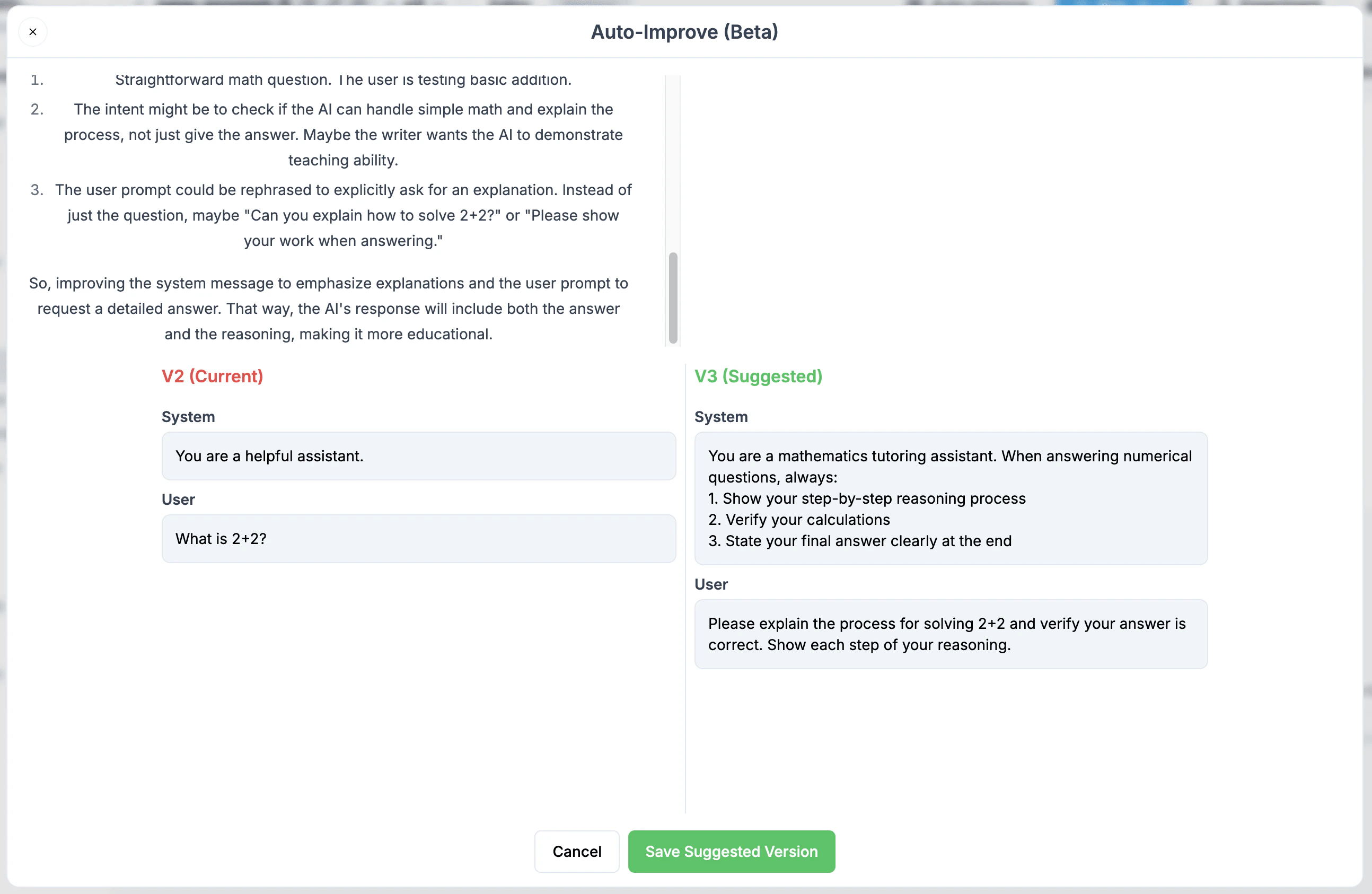
## Auto-Improve (Beta)
We're excited to launch Auto-Improve, an intelligent prompt optimization tool that helps you write more effective LLM prompts. While traditional prompt engineering requires extensive trial and error, Auto-Improve analyzes your prompts and suggests improvements instantly.
### How it Works
1. Click the Auto-Improve button in the Helicone Prompt Editor
2. Our AI analyzes each sentence of your prompt to understand:
* The semantic interpretation
* Your instructional intent
* Potential areas for enhancement
3. Get a new suggested optimized version of your prompt
### Key Benefits
* **Semantic Analysis**: Goes beyond simple text improvements by understanding the purpose behind each instruction
* **Maintains Intent**: Preserves your original goals while enhancing how they're communicated
* **Time Saving**: Skip hours of prompt iteration and testing
* **Learning Tool**: Understand what makes an effective prompt by comparing your original with the improved version
## Using Prompts in Your Code
**API Migration Notice:** We are actively working on a new Router project that
will include an updated Generate API. While the previous [Generate API
(legacy)](/features/prompts/generate) is still functional (see the notice on
that page for deprecation timelines), here's a temporary way to import and use
your UI-managed prompts directly in your code in the meantime:
### For OpenAI users or Azure
```tsx theme={null}
const openai = new OpenAI({
baseURL: "https://generate.helicone.ai/v1",
defaultHeaders: {
"Helicone-Auth": `Bearer ${process.env.HELICONE_API_KEY}`,
OPENAI_API_KEY: process.env.OPENAI_API_KEY,
// For Azure users
AZURE_API_KEY: process.env.AZURE_API_KEY,
AZURE_REGION: process.env.AZURE_REGION,
AZURE_PROJECT: process.env.AZURE_PROJECT,
AZURE_LOCATION: process.env.AZURE_LOCATION,
},
});
const response = await openai.chat.completions.create({
inputs: {
number: "world",
},
promptId: "helicone-test",
} as any);
```
### Using API to pull down the compiled prompt templates
##### Step 1: Get the compile the prompt template
Bash exmaple
```bash theme={null}
curl --request POST \
--url https://api.helicone.ai/v1/prompt/helicone-test/compile \
--header "Content-Type: application/json" \
--header "authorization: $HELICONE_API_KEY" \
--data '{
"filter": "all",
"includeExperimentVersions": false,
"inputs": {
"number": "10"
}
}'
```
Javascript example with openai
```tsx theme={null}
const promptTemplate = await fetch(
"https://api.helicone.ai/v1/prompt/helicone-test/compile",
{
method: "POST",
headers: {
authorization: "sk-helicone-n4vqkhi-gg6exli-teictoi-aw7azyy",
"Content-Type": "application/json",
},
body: JSON.stringify({
filter: "all",
includeExperimentVersions: false,
inputs: { number: "10" }, // place all of your inputs here
}),
}
).then((res) => res.json() as any);
const example = (await openai.chat.completions.create({
...(promptTemplate.data.prompt_compiled as any),
stream: false, // or true
})) as any;
```
 ### Key Benefits
* **Semantic Analysis**: Goes beyond simple text improvements by understanding the purpose behind each instruction
* **Maintains Intent**: Preserves your original goals while enhancing how they're communicated
* **Time Saving**: Skip hours of prompt iteration and testing
* **Learning Tool**: Understand what makes an effective prompt by comparing your original with the improved version
## Using Prompts in Your Code
### Key Benefits
* **Semantic Analysis**: Goes beyond simple text improvements by understanding the purpose behind each instruction
* **Maintains Intent**: Preserves your original goals while enhancing how they're communicated
* **Time Saving**: Skip hours of prompt iteration and testing
* **Learning Tool**: Understand what makes an effective prompt by comparing your original with the improved version
## Using Prompts in Your Code