> ## Documentation Index
> Fetch the complete documentation index at: https://docs.helicone.ai/llms.txt
> Use this file to discover all available pages before exploring further.
# LLM Caching
When developing and testing LLM applications, you often make the same requests repeatedly during debugging and iteration. Helicone caching stores complete responses on Cloudflare's edge network, eliminating redundant API calls and reducing both latency and costs.
**Looking for provider-level caching?** Learn about [Prompt Caching](/gateway/concepts/prompt-caching) to cache prompts directly on provider servers (OpenAI, Anthropic, etc.) for reduced token costs.
## Why Helicone Caching
Avoid repeated charges for identical requests while testing and debugging
Serve cached responses immediately instead of waiting for LLM providers
Protect against rate limits and maintain performance during high usage
## How It Works
Helicone's caching system stores LLM responses on Cloudflare's edge network, providing globally distributed, low-latency access to cached data.
### Cache Key Generation
Helicone generates unique cache keys by hashing:
* **Cache seed** - Optional namespace identifier (if specified)
* **Request URL** - The full endpoint URL
* **Request body** - Complete request payload including all parameters
* **Relevant headers** - Authorization and cache-specific headers
* **Bucket index** - For multi-response caching
Any change in these components creates a new cache entry:
```typescript theme={null}
// ✅ Cache hit - identical requests
const request1 = { model: "gpt-4o-mini", messages: [{ role: "user", content: "Hello" }] };
const request2 = { model: "gpt-4o-mini", messages: [{ role: "user", content: "Hello" }] };
// ❌ Cache miss - different content
const request3 = { model: "gpt-4o-mini", messages: [{ role: "user", content: "Hi" }] };
// ❌ Cache miss - different parameters
const request4 = { model: "gpt-4o-mini", messages: [{ role: "user", content: "Hello" }], temperature: 0.5 };
```
### Cache Storage
* Responses are stored in Cloudflare Workers KV (key-value store)
* Distributed across 300+ global edge locations
* Automatic replication and failover
* No impact on your infrastructure
## Quick Start
Add the `Helicone-Cache-Enabled` header to your requests:
```typescript theme={null}
{
"Helicone-Cache-Enabled": "true"
}
```
Execute your LLM request - the first call will be cached:
```typescript theme={null}
import OpenAI from "openai";
const client = new OpenAI({
baseURL: "https://ai-gateway.helicone.ai",
apiKey: process.env.HELICONE_API_KEY,
});
const response = await client.chat.completions.create(
{
model: "gpt-4o-mini",
messages: [{ role: "user", content: "Hello world" }]
},
{
headers: {
"Helicone-Cache-Enabled": "true"
}
}
);
```
Make the same request again - it should return instantly from cache:
```typescript theme={null}
// This exact same request will return a cached response
const cachedResponse = await client.chat.completions.create(
{
model: "gpt-4o-mini",
messages: [{ role: "user", content: "Hello world" }]
},
{
headers: {
"Helicone-Cache-Enabled": "true"
}
}
);
```
## Configuration
Enable or disable caching for the request.
Example: `"true"` to enable caching
Set cache duration using standard HTTP cache control directives.
Default: `"max-age=604800"` (7 days)
Example: `"max-age=3600"` for 1 hour cache
Number of different responses to store for the same request. Useful for non-deterministic prompts.
Default: `"1"` (single response cached)
Example: `"3"` to cache up to 3 different responses
Create separate cache namespaces for different users or contexts.
Example: `"user-123"` to maintain user-specific cache
Comma-separated JSON keys to exclude from cache key generation.
Example: `"request_id,timestamp"` to ignore these fields when generating cache keys
All header values must be strings. For example, `"Helicone-Cache-Bucket-Max-Size": "10"`.
## Examples
Use both provider caching and Helicone caching together by ignoring provider-specific cache keys:
Learn more about provider caching [here](/gateway/concepts/prompt-caching).
```typescript theme={null}
const response = await client.chat.completions.create(
{
model: "gpt-4o-mini",
messages: [{
role: "user",
content: "Analyze this large document with cached context..."
}],
prompt_cache_key: `doc-analysis-${documentId}` // Different per document
},
{
headers: {
"Helicone-Cache-Enabled": "true",
"Helicone-Cache-Ignore-Keys": "prompt_cache_key", // Ignore this for Helicone cache
"Cache-Control": "max-age=3600" // Cache for 1 hour
}
}
);
// Requests with the same message but different prompt_cache_key values
// will hit Helicone's cache, while still leveraging OpenAI's prompt caching
// for improved performance and cost savings on both sides
```
This approach:
* Uses OpenAI's prompt caching for faster processing of repeated context
* Uses Helicone's caching for instant responses to identical requests
* Ignores `prompt_cache_key` so Helicone cache works across different OpenAI cache entries
* Maximizes cost savings by combining both caching strategies
Avoid repeated charges while debugging and iterating on prompts:
```typescript Node.js theme={null}
import OpenAI from "openai";
const client = new OpenAI({
baseURL: "https://ai-gateway.helicone.ai",
apiKey: process.env.HELICONE_API_KEY,
defaultHeaders: {
"Helicone-Cache-Enabled": "true",
"Cache-Control": "max-age=86400" // Cache for 1 day during development
},
});
// This request will be cached - works with any model
const response = await client.chat.completions.create({
model: "gpt-4o-mini", // or "claude-3.5-sonnet", "gemini-2.5-flash", etc.
messages: [{ role: "user", content: "Explain quantum computing" }]
});
// Subsequent identical requests return cached response instantly
```
```python Python theme={null}
import os
import openai
client = openai.OpenAI(
base_url="https://ai-gateway.helicone.ai",
api_key=os.environ.get("HELICONE_API_KEY"),
default_headers={
"Helicone-Cache-Enabled": "true",
"Cache-Control": "max-age=86400" # Cache for 1 day
}
)
# Works with any model through the gateway
response = client.chat.completions.create(
model="gpt-4o-mini", # or "claude-3.5-sonnet", "gemini-2.5-flash", etc.
messages=[{"role": "user", "content": "Explain quantum computing"}]
)
```
Cache responses separately for different users or contexts:
```typescript theme={null}
const userId = "user-123";
const response = await client.chat.completions.create(
{
model: "claude-3.5-sonnet",
messages: [{
role: "user",
content: "What are my account settings?"
}]
},
{
headers: {
"Helicone-Cache-Enabled": "true",
"Helicone-Cache-Seed": userId, // User-specific cache
"Cache-Control": "max-age=3600" // Cache for 1 hour
}
}
);
// Each user gets their own cached responses
```
 ## Understanding Caching
### Cache Response Headers
Check cache status by examining response headers:
```typescript theme={null}
const response = await client.chat.completions.create(
{ /* your request */ },
{
headers: { "Helicone-Cache-Enabled": "true" }
}
);
// Access raw response to check headers
const chatCompletion = await client.chat.completions.with_raw_response.create(
{ /* your request */ },
{
headers: { "Helicone-Cache-Enabled": "true" }
}
);
const cacheStatus = chatCompletion.http_response.headers.get('Helicone-Cache');
console.log(cacheStatus); // "HIT" or "MISS"
const bucketIndex = chatCompletion.http_response.headers.get('Helicone-Cache-Bucket-Idx');
console.log(bucketIndex); // Index of cached response used
```
### Cache Duration
Set how long responses stay cached using the `Cache-Control` header:
```typescript theme={null}
{
"Cache-Control": "max-age=3600" // 1 hour
}
```
**Common durations:**
* 1 hour: `max-age=3600`
* 1 day: `max-age=86400`
* 7 days: `max-age=604800` (default)
* 30 days: `max-age=2592000`
Maximum cache duration is 365 days (`max-age=31536000`)
### Cache Buckets
Control how many different responses are stored for the same request:
```typescript theme={null}
{
"Helicone-Cache-Bucket-Max-Size": "3"
}
```
With bucket size 3, the same request can return one of 3 different cached responses randomly:
```
openai.completion("give me a random number") -> "42" # Cache Miss
openai.completion("give me a random number") -> "47" # Cache Miss
openai.completion("give me a random number") -> "17" # Cache Miss
openai.completion("give me a random number") -> "42" | "47" | "17" # Cache Hit
```
**Behavior by bucket size:**
* **Size 1 (default)**: Same request always returns same cached response (deterministic)
* **Size > 1**: Same request can return different cached responses (useful for creative prompts)
* Response chosen randomly from bucket
Maximum bucket size is 20. Enterprise plans support larger buckets.
### Cache Seeds
Create separate cache namespaces using seeds:
```typescript theme={null}
{
"Helicone-Cache-Seed": "user-123"
}
```
Different seeds maintain separate cache states:
```
# Seed: "user-123"
openai.completion("random number") -> "42"
openai.completion("random number") -> "42" # Same response
# Seed: "user-456"
openai.completion("random number") -> "17" # Different response
openai.completion("random number") -> "17" # Consistent per seed
```
Change the seed value to effectively clear your cache for testing.
### Ignore Keys
Exclude specific JSON fields from cache key generation:
```typescript theme={null}
{
"Helicone-Cache-Ignore-Keys": "request_id,timestamp,session_id"
}
```
When these fields are ignored, requests with different values for these fields will still hit the same cache entry:
```typescript theme={null}
// First request
const response1 = await openai.chat.completions.create(
{
model: "gpt-4o-mini",
messages: [{ role: "user", content: "Hello" }],
request_id: "req-123",
timestamp: "2024-01-01T00:00:00Z"
},
{
headers: {
"Helicone-Cache-Enabled": "true",
"Helicone-Cache-Ignore-Keys": "request_id,timestamp"
}
}
);
// Second request with different request_id and timestamp
// This will hit the cache despite different values
const response2 = await openai.chat.completions.create(
{
model: "gpt-4o-mini",
messages: [{ role: "user", content: "Hello" }],
request_id: "req-456", // Different ID
timestamp: "2024-02-02T00:00:00Z" // Different timestamp
},
{
headers: {
"Helicone-Cache-Enabled": "true",
"Helicone-Cache-Ignore-Keys": "request_id,timestamp"
}
}
);
// response2 returns cached response from response1
```
This feature only works with JSON request bodies. Non-JSON bodies will use the original text for cache key generation.
**Common use cases:**
* Ignore tracking IDs that don't affect the response
* Exclude timestamps for time-independent queries
* Remove session or user metadata when caching shared content
* Ignore `prompt_cache_key` when using provider caching alongside Helicone caching
### Cache Limitations
* **Maximum duration**: 365 days
* **Maximum bucket size**: 20 (enterprise plans support more)
* **Cache key sensitivity**: Any parameter change creates new cache entry
* **Storage location**: Cached in Cloudflare Workers KV (edge-distributed), not your infrastructure
## Related Features
Cache prompts on provider servers for reduced token costs and faster processing
Add metadata to cached requests for better filtering and analysis
Control request frequency and combine with caching for cost optimization
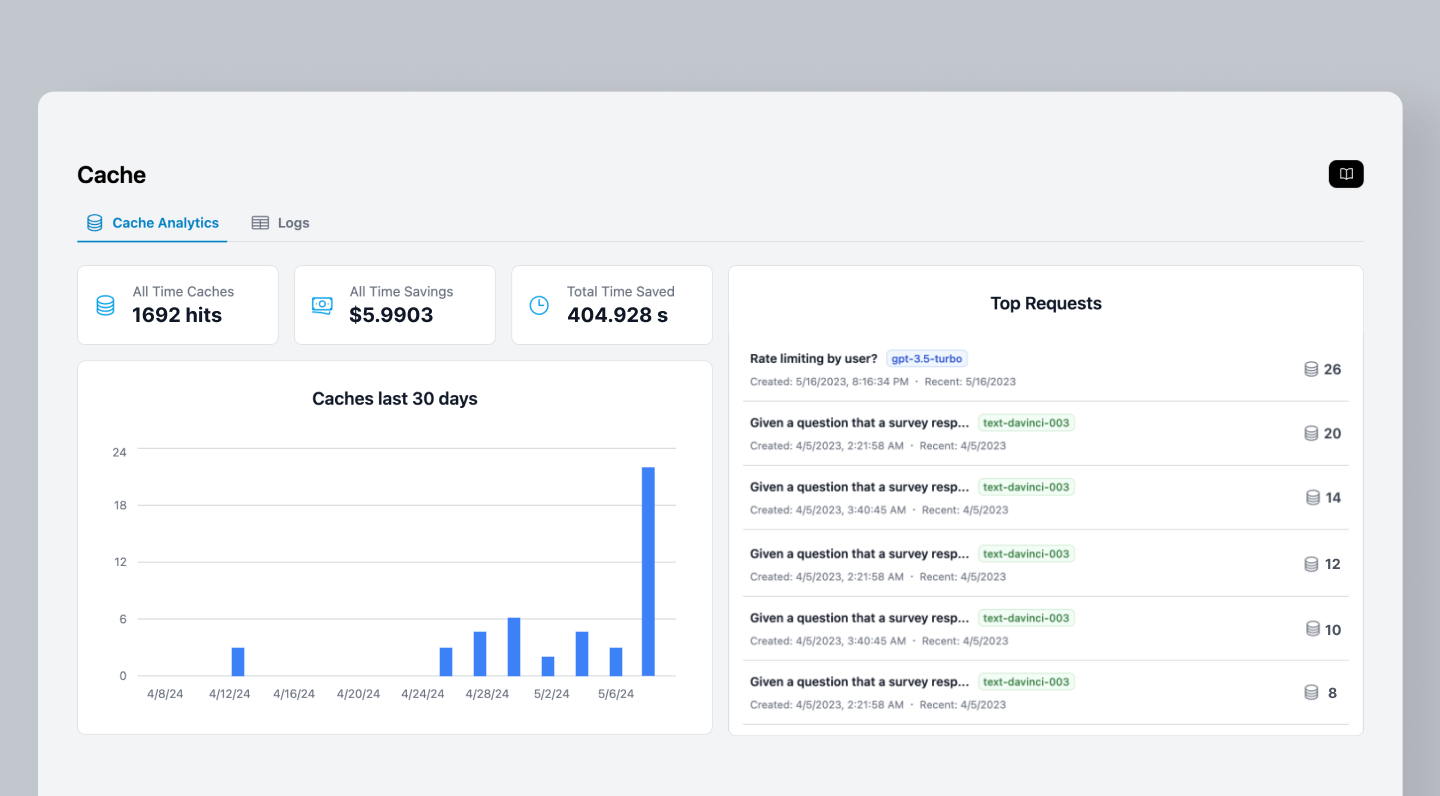
Track cache hit rates and savings per user or application
***
Additional questions or feedback? Reach out to
[help@helicone.ai](mailto:help@helicone.ai) or [schedule a
call](https://cal.com/team/helicone/helicone-discovery) with us.
## Understanding Caching
### Cache Response Headers
Check cache status by examining response headers:
```typescript theme={null}
const response = await client.chat.completions.create(
{ /* your request */ },
{
headers: { "Helicone-Cache-Enabled": "true" }
}
);
// Access raw response to check headers
const chatCompletion = await client.chat.completions.with_raw_response.create(
{ /* your request */ },
{
headers: { "Helicone-Cache-Enabled": "true" }
}
);
const cacheStatus = chatCompletion.http_response.headers.get('Helicone-Cache');
console.log(cacheStatus); // "HIT" or "MISS"
const bucketIndex = chatCompletion.http_response.headers.get('Helicone-Cache-Bucket-Idx');
console.log(bucketIndex); // Index of cached response used
```
### Cache Duration
Set how long responses stay cached using the `Cache-Control` header:
```typescript theme={null}
{
"Cache-Control": "max-age=3600" // 1 hour
}
```
**Common durations:**
* 1 hour: `max-age=3600`
* 1 day: `max-age=86400`
* 7 days: `max-age=604800` (default)
* 30 days: `max-age=2592000`
Maximum cache duration is 365 days (`max-age=31536000`)
### Cache Buckets
Control how many different responses are stored for the same request:
```typescript theme={null}
{
"Helicone-Cache-Bucket-Max-Size": "3"
}
```
With bucket size 3, the same request can return one of 3 different cached responses randomly:
```
openai.completion("give me a random number") -> "42" # Cache Miss
openai.completion("give me a random number") -> "47" # Cache Miss
openai.completion("give me a random number") -> "17" # Cache Miss
openai.completion("give me a random number") -> "42" | "47" | "17" # Cache Hit
```
**Behavior by bucket size:**
* **Size 1 (default)**: Same request always returns same cached response (deterministic)
* **Size > 1**: Same request can return different cached responses (useful for creative prompts)
* Response chosen randomly from bucket
Maximum bucket size is 20. Enterprise plans support larger buckets.
### Cache Seeds
Create separate cache namespaces using seeds:
```typescript theme={null}
{
"Helicone-Cache-Seed": "user-123"
}
```
Different seeds maintain separate cache states:
```
# Seed: "user-123"
openai.completion("random number") -> "42"
openai.completion("random number") -> "42" # Same response
# Seed: "user-456"
openai.completion("random number") -> "17" # Different response
openai.completion("random number") -> "17" # Consistent per seed
```
Change the seed value to effectively clear your cache for testing.
### Ignore Keys
Exclude specific JSON fields from cache key generation:
```typescript theme={null}
{
"Helicone-Cache-Ignore-Keys": "request_id,timestamp,session_id"
}
```
When these fields are ignored, requests with different values for these fields will still hit the same cache entry:
```typescript theme={null}
// First request
const response1 = await openai.chat.completions.create(
{
model: "gpt-4o-mini",
messages: [{ role: "user", content: "Hello" }],
request_id: "req-123",
timestamp: "2024-01-01T00:00:00Z"
},
{
headers: {
"Helicone-Cache-Enabled": "true",
"Helicone-Cache-Ignore-Keys": "request_id,timestamp"
}
}
);
// Second request with different request_id and timestamp
// This will hit the cache despite different values
const response2 = await openai.chat.completions.create(
{
model: "gpt-4o-mini",
messages: [{ role: "user", content: "Hello" }],
request_id: "req-456", // Different ID
timestamp: "2024-02-02T00:00:00Z" // Different timestamp
},
{
headers: {
"Helicone-Cache-Enabled": "true",
"Helicone-Cache-Ignore-Keys": "request_id,timestamp"
}
}
);
// response2 returns cached response from response1
```
This feature only works with JSON request bodies. Non-JSON bodies will use the original text for cache key generation.
**Common use cases:**
* Ignore tracking IDs that don't affect the response
* Exclude timestamps for time-independent queries
* Remove session or user metadata when caching shared content
* Ignore `prompt_cache_key` when using provider caching alongside Helicone caching
### Cache Limitations
* **Maximum duration**: 365 days
* **Maximum bucket size**: 20 (enterprise plans support more)
* **Cache key sensitivity**: Any parameter change creates new cache entry
* **Storage location**: Cached in Cloudflare Workers KV (edge-distributed), not your infrastructure
## Related Features
Cache prompts on provider servers for reduced token costs and faster processing
Add metadata to cached requests for better filtering and analysis
Control request frequency and combine with caching for cost optimization
Track cache hit rates and savings per user or application
***
Additional questions or feedback? Reach out to
[help@helicone.ai](mailto:help@helicone.ai) or [schedule a
call](https://cal.com/team/helicone/helicone-discovery) with us.